Courses Alpha
The courses teach you to read music, even if you have never done any music theory in your life. You take the lessons in order, and finishing one lets you go on to the next. Exercises go with the lessons, to practise what they cover.
Getting there
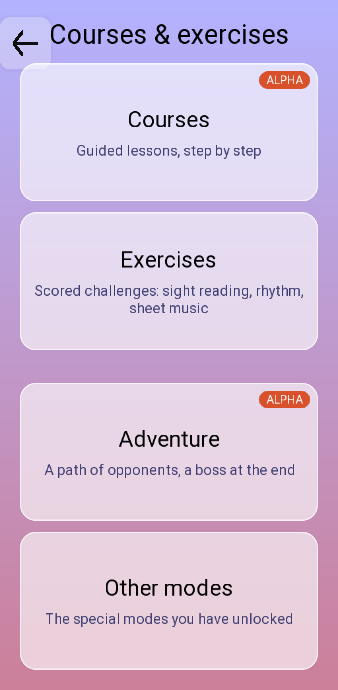
The Exercises button next to it is a different list, for the whole app. The exercises of a lesson are reached from the lesson itself.
The lesson list
 1
2
3
4
1
2
3
4
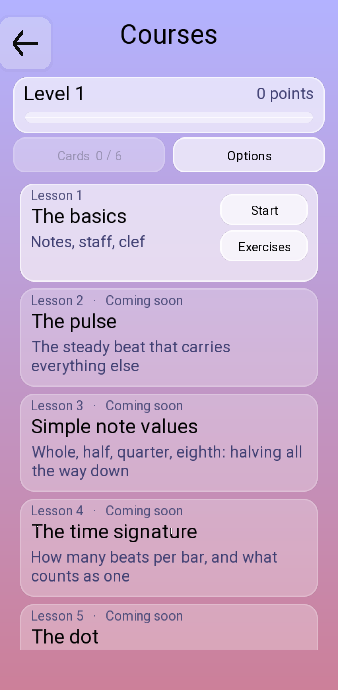
- Your level and your points.
- Your cards, and the options.
- The lesson you are on. Start opens it, Exercises opens what goes with it.
- A lesson still closed. The line next to it says what is missing.
You start at the top. Each lesson opens once the ones before it are done.
| Button | What it does |
|---|---|
| Cards | The cards you have earned, and how many there are in all. |
| Options | Note names as DO RE MI or C D E. It is the same setting as in sight reading. |
| Review | Takes the place of Start once a lesson is finished, and opens it again. |
| Exercises | Opens the exercises built on that lesson. |
Doing a lesson
Start opens the lesson, and you go through it to the end. It is then marked Completed in the list, and the next lesson opens.
A finished lesson keeps a Review button, to go back over it whenever you want.
The exercises of a lesson
 1
2
3
1
2
3
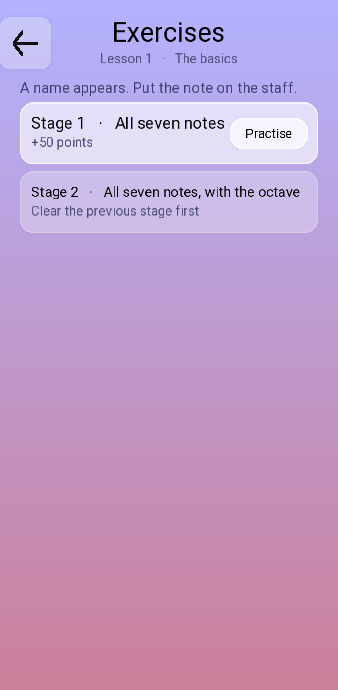
- Practise starts the stage.
- What the stage is worth.
- A stage still closed, and what to clear first.
Exercises on a lesson card opens the stages built on that lesson. The line at the top says what they ask of you. You have to clear a stage before the next one opens, and they stay there afterwards, so you can come back and practise.
Your own piano
A piano plugged in over USB works in the lessons too. Plugging one in is covered in getting started.
Points and cards
What you earn in the courses goes into the same place as everything else in the app. The points are the ones you spend in the shop. The cards are the ones you play in Adventure.