
Sight reading
One skill at a time: which note is that. No tempo, no rhythm, nothing to keep up with. A note appears on the staff and stays there until you play it.
The screen
 1
2
3
4
5
6
7
1
2
3
4
5
6
7
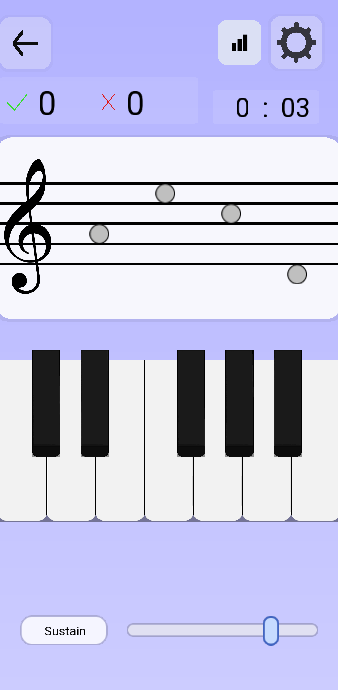
- Right and wrong, this session. The tick counts a note found on the first try; a note you fumble first goes to the cross.
- The session clock, counting up from zero.
- A shortcut straight into your reading summary.
- The gear: every option below lives behind it.
- The notes waiting to be played, left to right. The one you owe is the one furthest left.
- Sustain holds the sound after your finger leaves the key, like the right pedal.
- Volume for the on-screen keyboard.
How a round goes
A note is drawn, you play it, the next one comes. Play the wrong key and the cross goes up by one and the note stays — there is no moving on until you find it. That is deliberate: a note you had to search for is the one worth searching for again.
How many notes are on screen at once depends on one option:
| Setting | What you get |
|---|---|
| Mono | One note, alone in the middle of the staff. The cleanest way to drill a position you keep missing. |
| Sequential | Four notes queued left to right. You play them in order, and the staff refills as you clear them. Closer to real reading, because your eye has to look ahead. |
The options
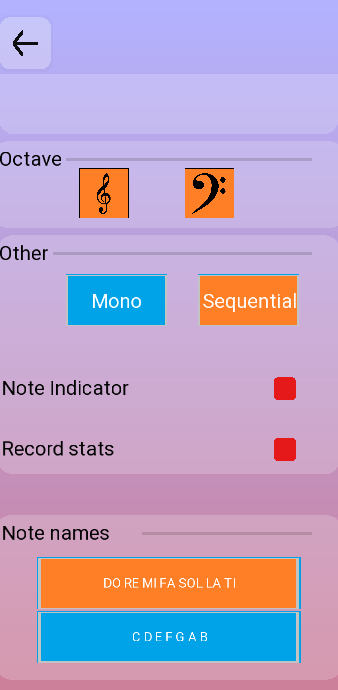
| Option | What it changes |
|---|---|
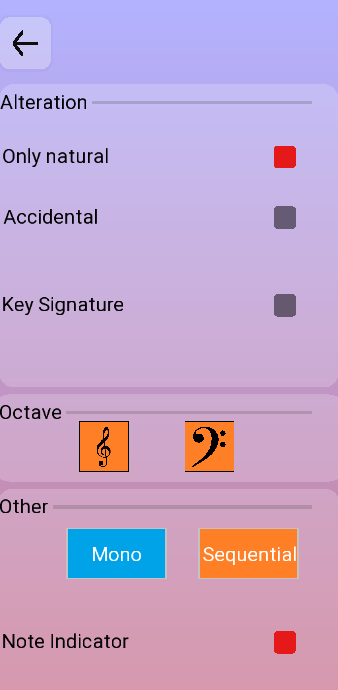
| Only natural | White keys only. No sharps, no flats, nothing written in front of the note. |
| Accidental | Sharps and flats appear in front of individual notes, the way an accidental does mid-piece. |
| Key Signature |
Puts a key signature at the head of the staff, and opens two
controls under the switch. First sharps or flats,
two buttons, one or the other. Then how many, on a
slider — and that number is the real setting.
Next to the number the app names the key it produces, and it names both: three sharps reads (A major / F♯ minor), because one signature always serves a major key and its relative minor. Zero gives (C major / A minor) — the same notes as Only natural, but written with an empty signature at the head of the staff. A separate major / minor button sits alongside. It changes nothing about the notes you are asked to play: it decides which of the two names that key is filed under in your reading summary. |
| Octave | The two buttons here pick the clef the notes are written in — treble, bass, or both at once. With both on, the app alternates between them from one note to the next. |
| Note Indicator | Draws the note you just played on the staff, ledger lines and all, so you can see where your answer landed next to where it should have. Turn it off once you no longer need the confirmation. |
| Record stats | On by default. Turn it off and this session is not written to the summary — useful when you are only trying a setting out. |
| Note names | DO RE MI FA SOL LA TI or C D E F G A B. It changes the names used throughout the app, not just here. |
The reading summary
Sessions are counted along two axes, and both are the ones that go wrong in practice: the clef a note was written in, and the key signature in force at the time.
That is what makes the summary worth opening. An overall percentage tells you almost nothing; treble 94 %, bass 61 % tells you exactly what to practise tomorrow, and a column that collapses whenever three flats are on the staff tells you something a general score would have averaged away.
If the bass clef is the half that drags — and for most people it is — there is a longer piece on why, and what to do about it, in how to read bass clef notes without counting up from middle C.
Getting the most out of it
- Start narrow. One clef, Only natural, Mono. Widen only when the score stops moving.
- Switch off the indicator early. Seeing your own answer drawn back at you is a crutch, and a comfortable one. The moment you are getting most of them, turn it off.
- Short and often beats long and rare. Five minutes a day moves the bass clef column; an hour on Sunday does not.
- Go to Key Signature sooner than feels comfortable. Real scores have key signatures on every line, and reading them as an afterthought is what slows people down years later.